
Absolutely—just plug langchain_rag into the llm-router 😉

Intro
Hello! Today we are showing additional capabilities of the LLM Router in the form of plugins, actually just one plugin langchain_rag. This is a plugin that creates a local knowledge base from the content provided during the indexing process. It uses well‑known solutions such as langchain to create a RAG system and fais as a vector knowledge base. Then the created knowledge base can be attached to any query in the LLM Router, without modifying the application that currently uses generative models. What does this approach provide?
The ability to automatically enrich the context passed to the generative model — i.e., the standard RAG approach. It is enough to index the documents you choose using the available CLI command llm-router-rag-langchain index [OPTIONS] and all those contents are available to the generative model when generating a response.
What does this provide?
The ability to automatically enrich the context passed to the generative model — i.e., the standard RAG approach. It is enough to index the documents you choose using the available CLI commandllm-router-rag-langchain index [OPTIONS], and all those contents are available to the generative model when generating a response.
Indexation
Data indexing is the step in which, from a given directory, files with specified extensions are stored in a local knowledge base. The knowledge‑base plugin uses a loaded embedder model (by default configured asgoogle/embeddinggemma-300mllm-router-rag-langchain. The command is installed in the CLI, so it is available from any router directory.
In today’s example we used all the descriptions from the main repository and sub‑repositories of LLM Router as the knowledge base:
- Main llm-routera repository: md and txt files;
- Plugins repository (including the described plugin) – files in md, txt format;
- Services handling guardrails and maskers plugins – md and txt;
- Repository with example tools using llm‑router – md and txt files;
- Dedicated graphical interfaces for Anonymizer and Configs Manager – also md and txt files;
- llm-router.cloud website – html, md, and txt files;
For simplicity we added a basic Bash script in which you only need to change the file types and indexing paths and, without modifying any other settings from the main router directory, issue the command [here full script]:
bash scripts/llm-router-rag-langchain-index.shBecause of this, a local knowledge base will be saved in the default directory: workdir/plugins/utils/rag/langchain/sample_collection/, which can then be attached as the knowledge base in the llm‑router.
Running the knowledge base in LLM Router
The knowledge base is loaded by default from the directory where the LLM Router is started, but the storage/load location can be set arbitrarily with the environment variable LLM_ROUTER_LANGCHAIN_RAG_PERSIST_DIR. For the LLM Router to use the created knowledge base, the langchain_rag plugin must be activated and the path to the created knowledge base must be set. After starting the router with such a configuration, every query to the generative model will be enriched with context from the attached knowledge base. Activating the plugin simply means exporting the environment variable with utils‑type plugins when launching the router (the default scipt allows modification).
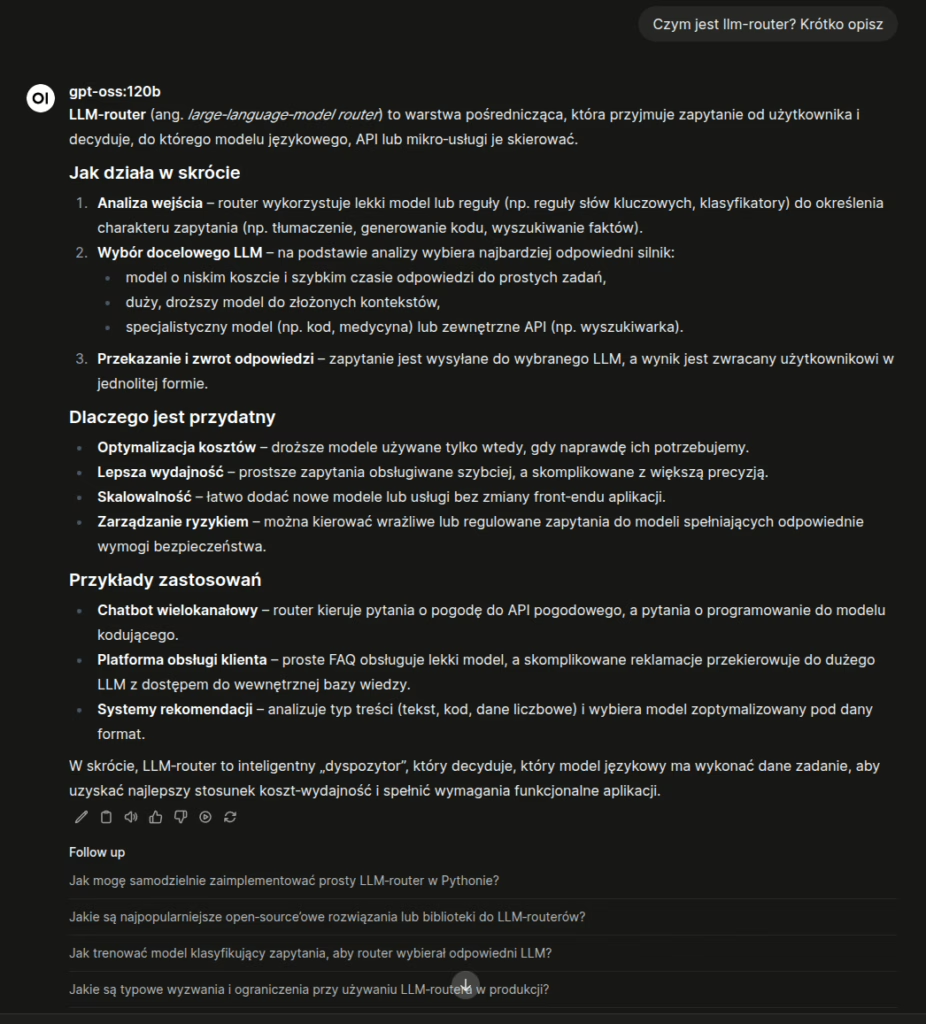
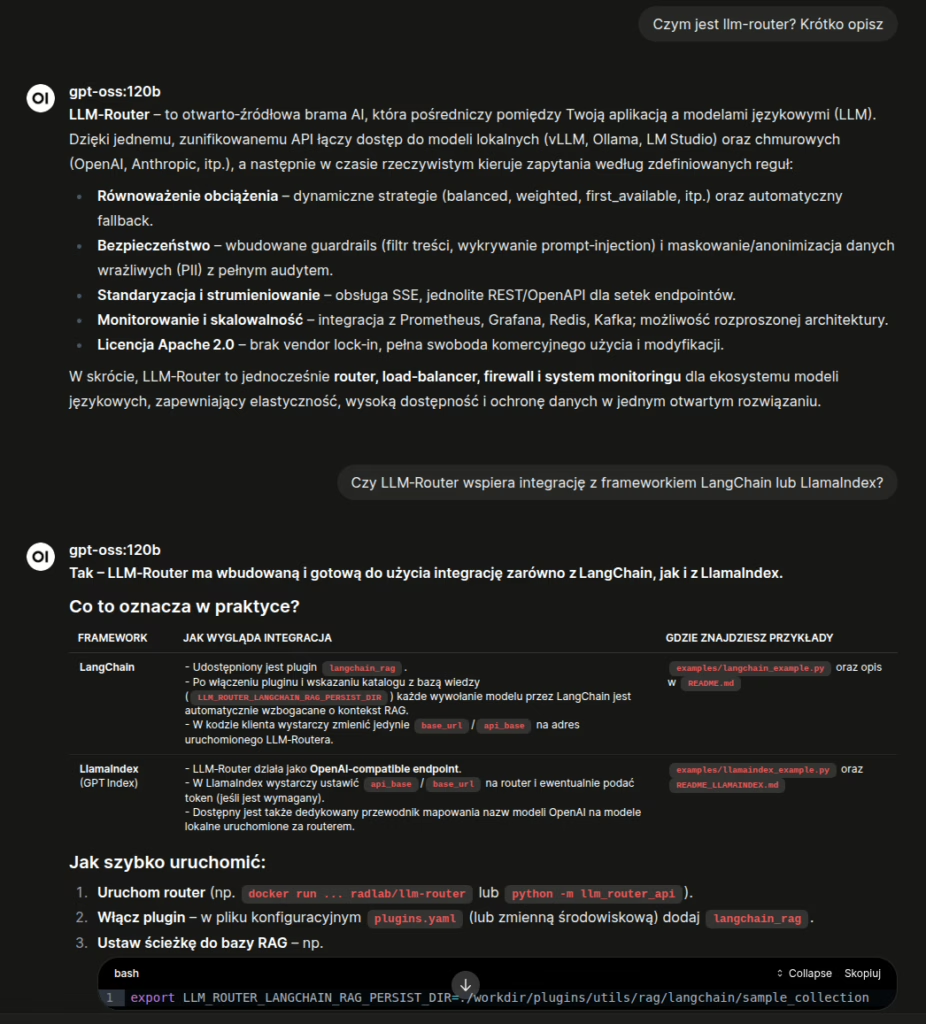
export LLM_ROUTER_UTILS_PLUGINS_PIPELINE="langchain_rag"And that’s basically it—if you don’t modify parameters such as context size or the embedder, there’s nothing you need to change or configure—just index your own data 🙂 How it looks in practice. Below, in the screenshot, is the model’s response without the attached langchain_rag plugin, with the indexed content:
And the response with the plugin attached:
Outro
And to wrap up, here’s a console video showing how to index the mentioned content:
and switching the router to operate in knowledge‑base mode (the beginning of the video shows the router running without a knowledge base, the second part shows it running with an attached knowledge base):
Starring: OpenWeb UI with the LLM‑Router attached (with the langchain_rag plugin disabled and enabled).
We encourage you to download, try it out, and share your impressions of using it 🙂